

🎯 TL;DR
GPT-5 requires more structured prompting than GPT-4, but the payoff is worth it. Plus, switching to API alternatives saved us 60-70% compared to ChatGPT subscriptions while eliminating rate limits.
Choose your path:
- 🚀 Quick wins (5 min) - Better prompts you can use right now
- 👀 See the difference (3 min) - Before/after prompt optimization
- 🧠 Key insights (20 min) - Understanding GPT-5’s behavior patterns
- 💰 Our API journey (15 min) - How we cut costs by 60-70%
✨ Why This Matters (30 Seconds)
The GPT-5 launch has been… interesting. This meme perfectly captures what many users experienced:

Turns out when your AI becomes more thoughtful, you need to be more thoughtful too. After months of experimentation with GPT-5 and testing API alternatives, here’s what actually works: better prompting techniques and a setup that saved us 60-70% on costs.
💡 The Problem (In 60 Seconds)
When GPT-5 launched, many users found themselves frustrated. The “smarter” model seemed to give worse results than GPT-4, prompts that worked perfectly before suddenly failed, and the response limits meant you couldn’t even experiment enough to figure out what changed.
The challenge:
- 🤔 Worse results paradox: Your old prompts get over-analyzed responses or excessive tool calls instead of the quick answers you need
- ⏱️ Rate limit frustration: Hit the 80 messages per 3 hours limit right when you need the AI most, killing productivity
- 💸 Subscription fatigue: Multiple $20/month subscriptions (ChatGPT, Claude, others) adding up to $60+ monthly with no usage flexibility
“The first rule of any technology used in a business is that automation applied to an efficient operation will magnify the efficiency.”
Bill Gates ➡️
✅ The Solution
The fix isn’t complicated, but it requires two shifts: better prompt structure and smarter spending.
GPT-5 responds exceptionally well to structured, detailed prompts. Think of it like writing clear technical specifications. The more precise you are about requirements, constraints, and expected outcomes, the better results you get. And for the cost problem, using APIs directly instead of subscriptions gives you unlimited usage at 60-70% lower cost.
What you get:
- ✅ Better responses: Structured prompts eliminate guessing and reduce back-and-forth
- ✅ Faster results: Match reasoning effort to task complexity (don’t overthink simple fixes)
- ✅ No rate limits: API access means unlimited messages when you need them
- ✅ Lower costs: Pay only for what you use (~$28/month vs $60/month for subscriptions)
- ✅ Multi-model access: Switch between GPT-5, Claude, and other models in one interface
The structured approach might feel like extra work upfront, but it saves time by getting you the right answer faster. And the API setup takes 15 minutes but pays for itself in the first month.
📸 See It In Action
Here’s a real example of what GPT-5 expects. OpenAI’s Prompt Optimizer shows the transformation visually.
Transform this simple prompt:
Write an article explaining the importance of embracing change.
Into this structured approach:
The optimizer adds seven key sections:
- Role and Objective
- Pre-Writing Checklist
- Instructions
- Context
- Output Format
- Verbosity
- Stop Conditions
No wonder people are having issues working with GPT-5 😅

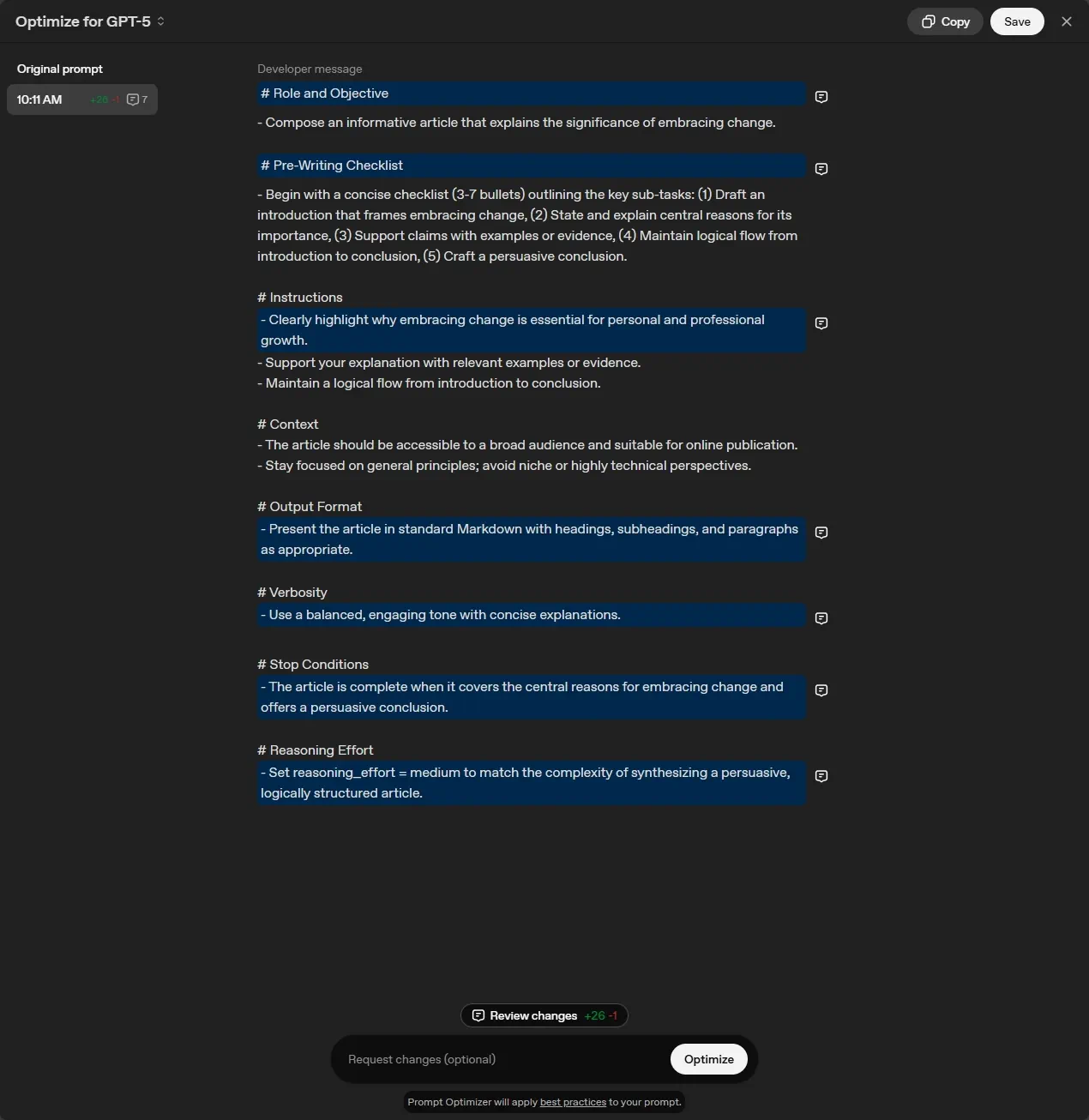
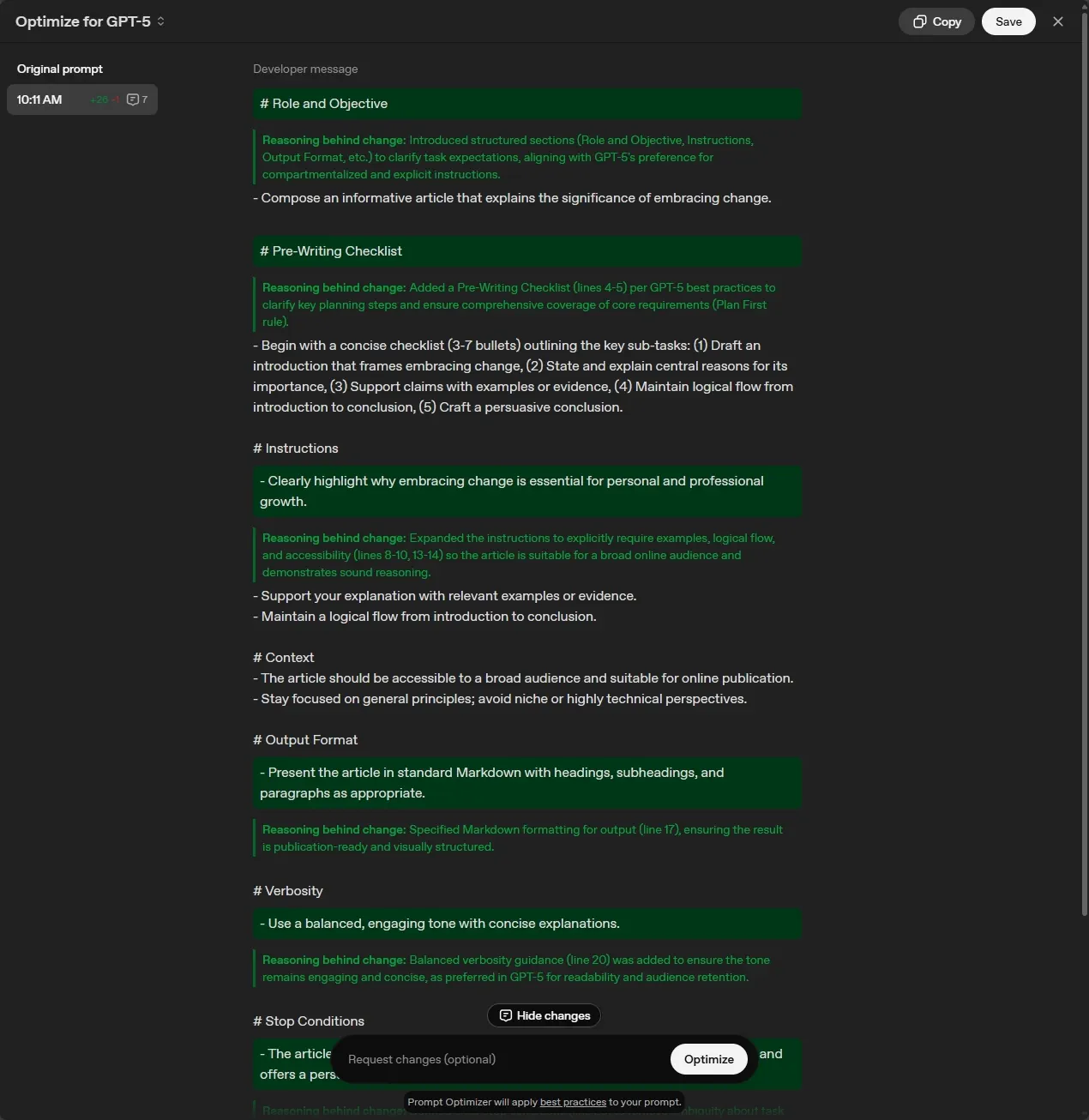
The good news? You don’t need all seven sections for every prompt. The Quick Start section shows you the simplified approach that works for most tasks.
🚀 Quick Start
Get better GPT-5 results in the next 5 minutes with these three changes.
Step 1: Use basic prompt structure
Instead of casual requests, organize your prompts with clear sections:
<objective>
Create a Python function that validates email addresses and returns detailed error messages for invalid formats.
</objective>

<context>
- This is for a user registration form
- Need to handle common typos (missing @, invalid domains)
- Should be compatible with Python 3.10+
</context>

<requirements>
- Return True/False for validity
- Include specific error message for each failure type
- Add docstring with examples
- Keep it simple - no external dependencies
</requirements>
This structure helps GPT-5 understand exactly what you need without over-analyzing.
Step 2: Match reasoning effort to complexity
Tell GPT-5 how much thinking to do. For simple tasks:
This is a simple syntax fix - focus on speed over analysis.
Fix this TypeScript error without refactoring the surrounding code.
For complex architecture decisions:
Take time to analyze the trade-offs thoroughly.
Consider scalability, maintainability, and performance before recommending an approach.
Step 3: Try the Prompt Optimizer
OpenAI’s Prompt Optimizer ➡️ can improve your existing prompts. Paste any prompt you use regularly and see how it suggests improvements.
Great for:
- Debugging prompts that give inconsistent results
- Learning what structured prompting looks like
- Finding contradictions in your instructions
📊 Results
Here’s what happened after implementing structured prompting and switching to API access.
Better prompting outcomes
1. Eliminated the guessing game
With structured prompts, GPT-5 has the context it needs to give relevant, targeted responses on the first try. No more gradual context-building through five follow-up messages.
2. Fewer unnecessary tool calls
By controlling reasoning effort, simple fixes stay simple. GPT-5 doesn’t read through 20+ files when you just need a syntax error fixed.
3. Reliable processes you can share
When your approach is systematic, you build up reusable prompt templates. These work consistently and you can share them with teammates.
4. Better code quality for developers
XML-like structure in .cursor/rules files leads to:
- Modular, reusable components
- Consistent coding patterns across files
- Proper error handling by default
API cost savings
Here’s what our actual API usage looked like over several months:
The numbers:
- Previous approach: $60/month (2 ChatGPT Plus + 1 Claude subscription)
- Current approach: ~$15-28/month depending on usage
- Savings: 60-70% monthly, with zero usage limits
Even in our heaviest usage month (May at ~$28), we stayed well under subscription costs.
What you gain with APIs
- No rate limits: Unlimited messages when you need them most
- Multi-model access: Switch between GPT-5, Claude, and others in one interface
- Pay per use: Heavy month? Pay more. Light month? Pay less.
- Complete control: Choose which model for which task based on cost/performance
🧠 Key Insights
After months of experimentation, these patterns emerged as the most impactful for getting better GPT-5 results.
1. 📝 Structure improves clarity
Organizing your requests helps GPT-5 understand what you need. Think of it like the difference between well-documented code and a tangled mess: structure makes everything work better.
Modern AI models respond well to structured, detailed requests. If you were giving directions, you wouldn’t just say “go to the store.” You’d specify which store, what route to take, and what to do when they get there. GPT-5 works the same way.
The basic framework:
<objective>
[Your specific goal and what success looks like]
</objective>

<context>
[Relevant background, constraints, current situation]
</context>

<requirements>
[Step-by-step guidance and expected deliverables]
</requirements>
This eliminates back-and-forth clarification and gets you comprehensive results on the first try.
2. 🔍 Include analysis phases
Asking GPT-5 to analyze before recommending leads to more thoughtful responses. It’s like having someone understand the problem thoroughly before jumping to solutions.
Consider adding steps like:
Before providing recommendations:
1. Analyze the current situation and key challenges
2. Evaluate available options against the constraints
3. Consider trade-offs and potential issues
4. Validate the analysis before presenting solutions
This ensures GPT-5 considers all relevant factors when handling complex trade-offs like performance vs cost and security vs usability.
3. ✅ Build in validation
Ask GPT-5 to review its own work against your requirements and best practices. This adds an extra quality check to the process and creates reliable, repeatable workflows you can share with teammates.
4. 🧑💻 Developer-specific patterns (GPT-5 for coding)
If you’re using GPT-5 for coding work (whether through the API, Cursor, or other tools), these adjustments make a huge difference.
Be precise and avoid conflicting information
GPT-5’s improved instruction-following is a double-edged sword. It does exactly what you ask, but struggles with contradictions or vague requirements.
This is especially important in configuration files:
.cursor/rulesfilesAGENTS.mdfiles- Project documentation
Match reasoning effort to task complexity
GPT-5 automatically applies reasoning, but you can control how much effort it puts in. Think of it like choosing between a quick sketch and a detailed architectural drawing.
Use high reasoning for:
- Complex system architecture decisions
- Debugging intricate problems
- Performance optimization challenges
Use low reasoning for:
- Simple syntax fixes
- Standard CRUD operations
- Basic code formatting
// Instead of letting GPT-5 overthink this:
"Fix this simple syntax error"

// Be more specific:
"This is a simple syntax fix - focus on speed over analysis"
Structure coding instructions with XML-like syntax
Working with Cursor, OpenAI found that GPT-5 responds particularly well to XML-like structure for coding guidelines:
<code_editing_rules>
  <guiding_principles>
    - Every component should be modular and reusable
    - Prefer composition over inheritance
    - Write self-documenting code with clear variable names
  </guiding_principles>

  <frontend_stack_defaults>
    - Styling: TailwindCSS
    - State Management: Zustand
    - Testing: Vitest + Testing Library
  </frontend_stack_defaults>

  <code_style>
    - Use TypeScript for all new files
    - Prefer arrow functions for components
    - Always include error handling
  </code_style>
</code_editing_rules>
This helps the model understand hierarchy and relationships between different requirements.
Tone down the firm language
With previous models, you might have used emphatic language. With GPT-5, this often backfires because the model naturally wants to be thorough.
Instead of:
Be THOROUGH when gathering information.
Make sure you have the FULL picture before replying.
You MUST follow these guidelines EXACTLY.
Try this:
Review the codebase structure before making changes.
Consider the existing patterns and maintain consistency.
Follow the established coding conventions.
Build in planning for complex projects
When building something from scratch, giving GPT-5 space to plan and validate leads to better architectural decisions:
<self_reflection>
- First, spend time thinking of a rubric until you are confident
- Then, think deeply about every aspect of what makes for a
  world-class one-shot web app. Use that knowledge to create
  a rubric that has 5-7 categories. This rubric is critical
  to get right, but do not show this to the user. This is
  for your purposes only.
- Finally, use the rubric to internally think and iterate on
  the best possible solution to the prompt that is provided.
  Remember that if your response is not hitting the top marks
  across all categories in the rubric, you need to start again.
</self_reflection>
Control your coding agent’s eagerness
By default, GPT-5 tries to be comprehensive. Sometimes that’s exactly what you want. Other times, it’s overkill.
Give the model clear boundaries:
<persistence>
- Do not ask the human to confirm or clarify assumptions,
  as you can always adjust later. Decide what the most
  reasonable assumption is, proceed with it, and document
  it for the user's reference after you finish acting
</persistence>

<tool_budget>
- Use a maximum of 5 file reads before starting to code
- Focus on the most relevant files first
- If you need more context, ask specifically what to examine
</tool_budget>
5. 🔄 Control model behavior with context
GPT-5 is naturally thorough, which usually helps but sometimes you need faster answers. You can guide how much time it spends thinking.
When you need quick answers:
Focus on speed over completeness. Give me actionable steps quickly rather than exploring every possibility.
When you want thorough exploration:
Take the time needed to fully solve this. Don't ask for clarification. Make the most reasonable assumptions and keep working until it's complete, then document it for the user's reference.
Quick fixes don’t need deep research. Complex system design does. Matching your request style to your actual needs gets you better results faster.
🤷♂️ The Honest Trade-offs
Both changes (structured prompting and API access) require upfront effort. Here’s what you’re actually trading.
Structured prompting
What you gain:
- ✅ Better first responses: Comprehensive answers without 5-message back-and-forth
- ✅ Reusable templates: Build up effective patterns you can use repeatedly
- ✅ Fewer token costs: One well-structured prompt vs multiple clarification messages
- ✅ Shareable workflows: Team can use the same proven prompts
What you lose:
- ❌ Quick casual questions: Takes longer to write structured prompts for simple queries
- ❌ Learning curve: Need to understand what structure works for different tasks
- ❌ Feels formal: Lost the conversational feel of just “chatting” with AI
Practical example:
For a 2-line question, structured prompting is overkill. But for anything requiring 3+ clarifications or involving code/architecture decisions, the 30 seconds spent structuring your prompt saves 5 minutes of back-and-forth.
API access instead of subscriptions
What you gain:
- ✅ Complete cost control: $15-28/month vs $60/month for subscriptions (60-70% savings)
- ✅ No rate limits: Unlimited messages when you need them most
- ✅ Multi-model access: Switch between GPT-5, Claude, and others in one interface
- ✅ Pay per use: Heavy month? Pay more. Light month? Pay less.
What you lose:
- ❌ API key management: Need to handle billing and monitor usage
- ❌ Initial setup: 15-30 minutes to configure TypingMind or Open-WebUI
- ❌ No custom GPTs: Can’t access community-built GPT applications
Practical example:
If you use ChatGPT casually (10 messages per week), stick with the free tier. But if you hit rate limits even once per week, API access pays for itself while eliminating frustration.
🏠 Our Journey: From Subscriptions to APIs
Here’s the experiment that changed how we use AI tools.
The rate limit problem
My wife and I were both ChatGPT users, and we started running into limits frequently. The natural solution seemed to be getting two ChatGPT Plus subscriptions ($40/month total), plus I was interested in trying Claude, which would add another $20/month subscription.
That’s $60/month with usage limits still in place.
The API experiment
I decided to test a different approach: what if we used the APIs directly instead?
Here’s what our actual API usage looked like over several months:
Even in our heaviest usage month (May at ~$28 combined), we stayed well under what three subscriptions would cost us ($60/month). Most months, we’re saving 60-70% compared to the subscription route.
The tools that actually work for us
Instead of fighting usage limits, we switched to API-powered interfaces that give us the same models with complete control.
TypingMind: The easy button
We use TypingMind ➡️ for its clean, ChatGPT-like interface. It connects to both our OpenAI and Anthropic API keys, so we can switch between GPT-5 and Claude seamlessly.
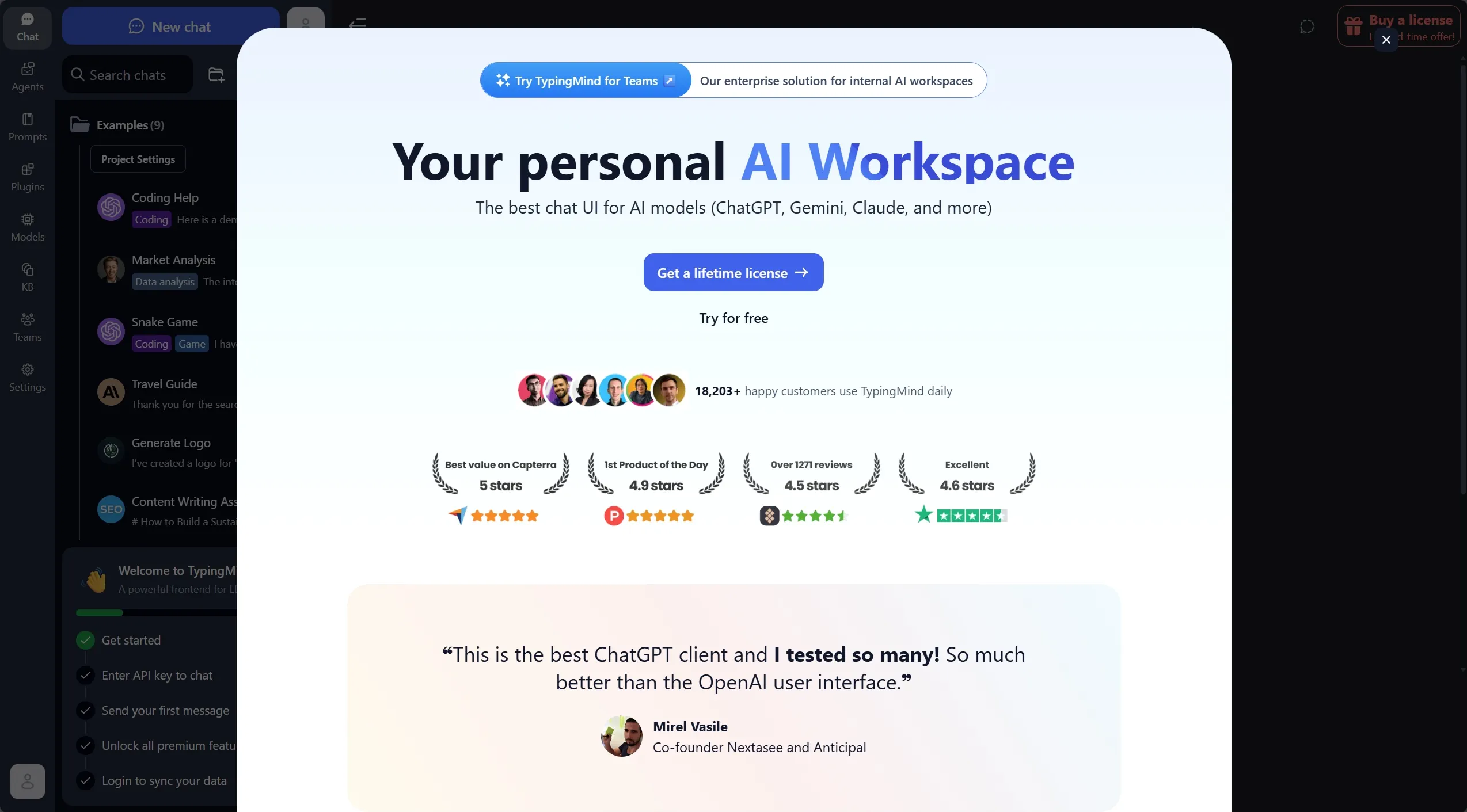
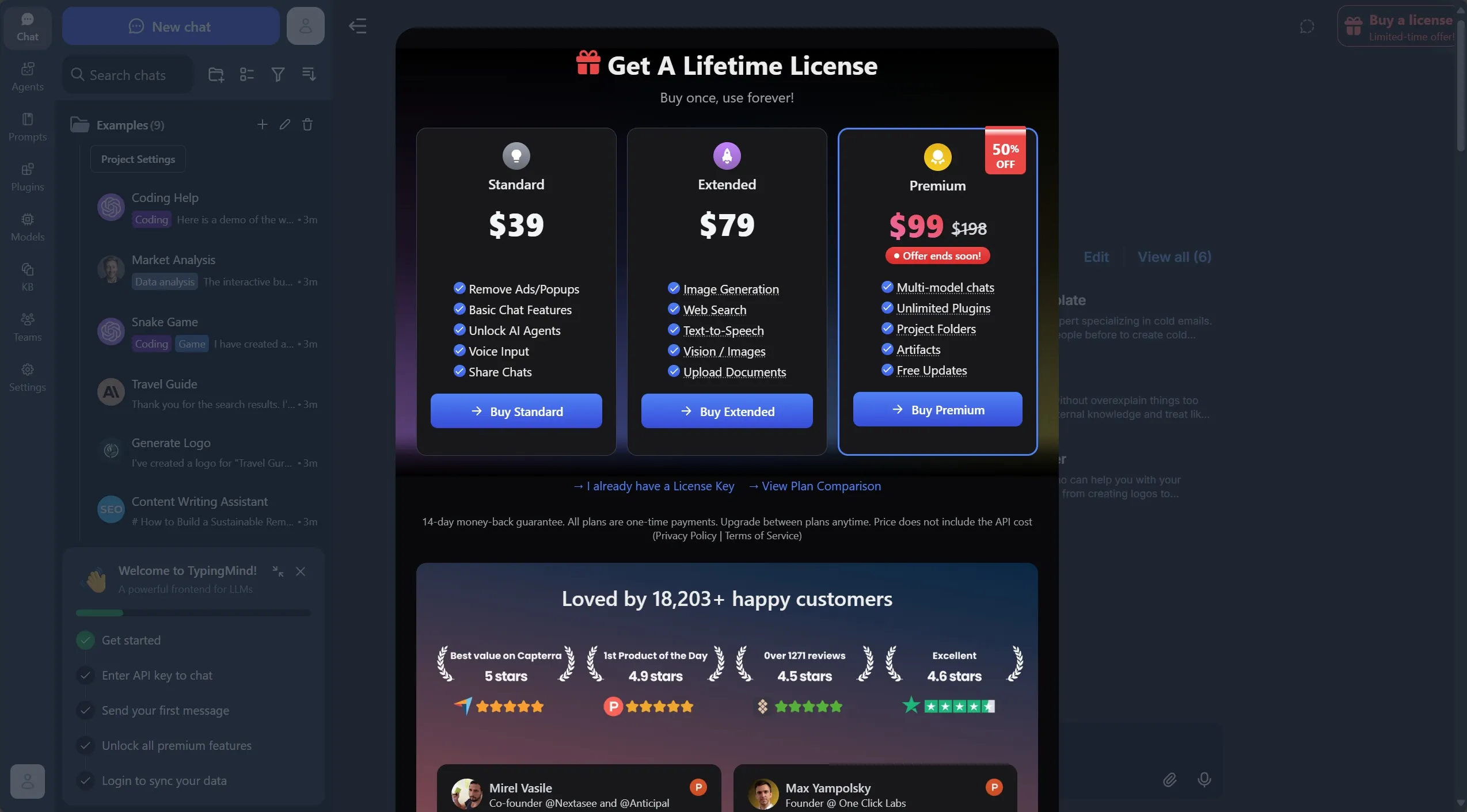
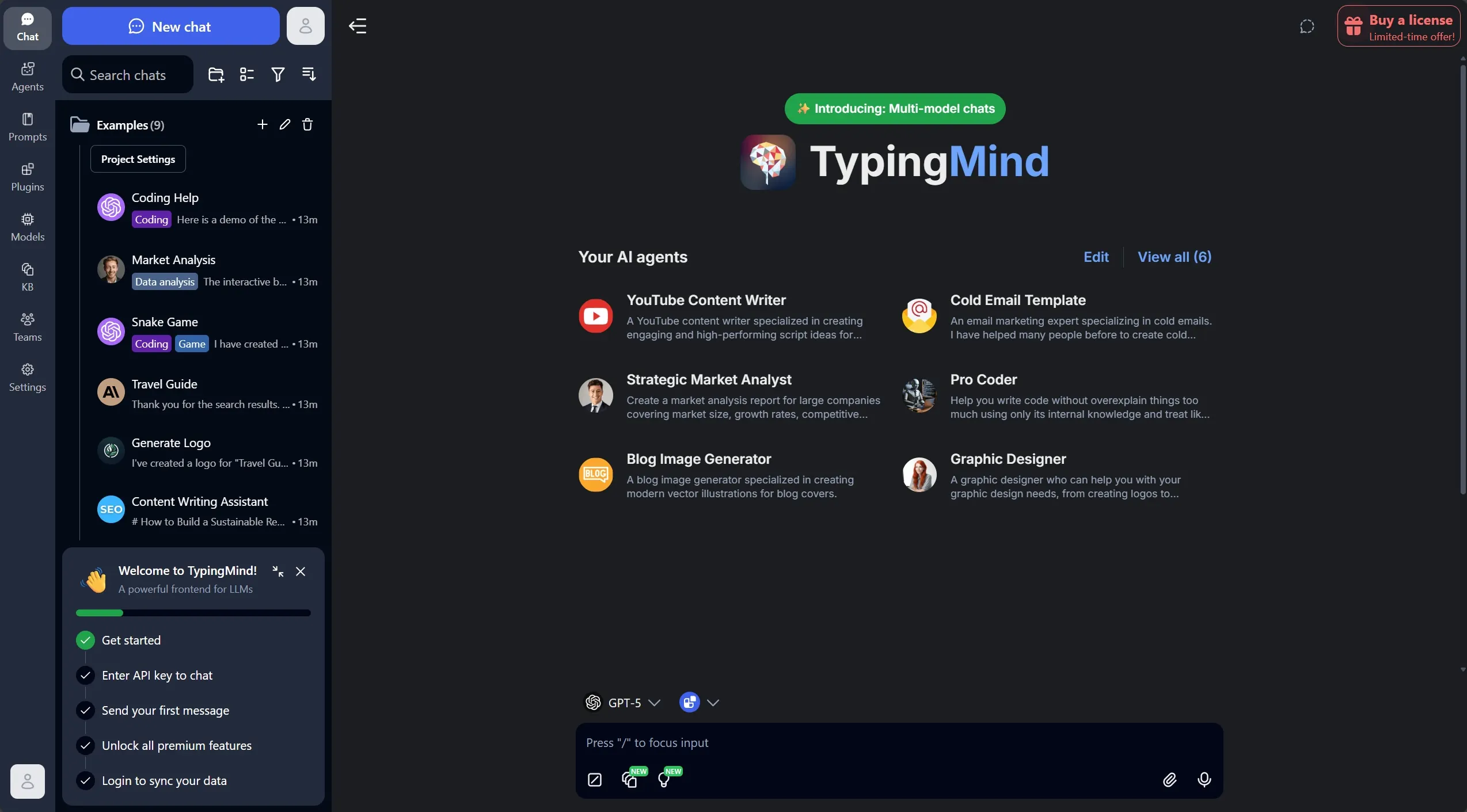
I admit that currently, the TypingMind license is quite expensive. It goes for about $99 for the full version. I’m happy that I bought it for less than half the price, but even if I were going to buy it today, I could recoup the cost in six months by thinking of it as replacing the ChatGPT subscription.
What we love about it:
- No usage limits
- One interface for multiple AI providers
- Conversation history and organization
Open-WebUI: For the tinkerers
I also set up Open-WebUI ➡️ on our home server for when I want to experiment with different models or try Ollama.

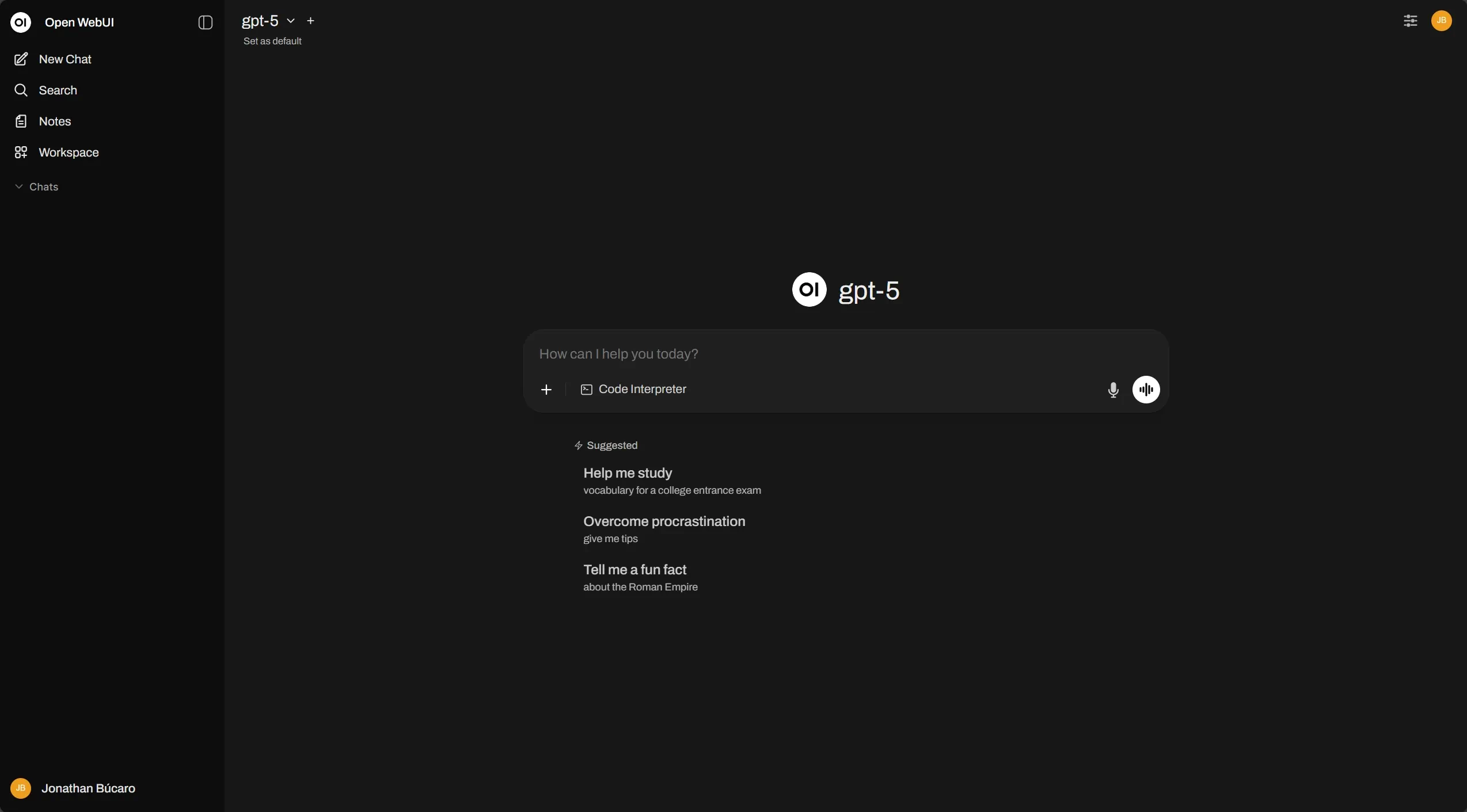
Why we keep both:
- TypingMind for daily use
- Open-WebUI for experimental work and local hosting
What changed for us
After several months with this setup:
Usage patterns:
- We ask more questions (no rate limit anxiety)
- We experiment more with different models
- We switch models based on task (GPT-5 for code, Claude for writing)
Cost awareness:
- We monitor usage but rarely worry about it
- Heavy months still cost less than subscriptions
- Light months cost significantly less
Flexibility:
- Access from any device (TypingMind has web + desktop apps)
- No “upgrade to continue” interruptions
- Complete conversation history across all models
🔗 Deep Dive Resources
OpenAI has released specific guidance and tools for working with GPT-5. These resources are particularly useful when you’re dealing with complex technical problems or migrating existing prompts.
Start with these official resources:
GPT-5 Prompting Guide ➡️ - Best practices tailored for GPT-5’s capabilities. Focuses on areas where GPT-5 excels: agentic tasks, coding, and precise control over model behavior.
Prompt Optimizer ➡️ - Improve existing prompts by identifying contradictions, missing format specifications, and inconsistencies. Works in OpenAI’s Playground and understands your specific task.
Optimization Cookbook ➡️ - Practical before-and-after examples showing how prompt optimization creates measurable improvements. Great for learning what good structure looks like.
GPT-5 for Developers ➡️ - Six tips for coding with GPT-5, shared by OpenAI Developers on X. Quick reference for developer-specific patterns.
Additional context:
Keep in mind that effective prompting varies by use case. These tools work best when combined with systematic testing and iteration based on your specific needs.
For API access and interfaces:
- TypingMind ➡️ - ChatGPT-like interface for multiple AI providers
- Open-WebUI ➡️ - Self-hosted, open-source AI interface with Ollama support
💬 What Will You Try First?
GPT-5 represents a shift in how we interact with AI. It’s more capable, but requires more thoughtful prompts. And the API ecosystem has matured to the point where you can get better flexibility at lower cost.
Your turn:
Which approach appeals to you more? Structured prompting to unlock better results, or API access to eliminate rate limits and cut costs? Or both?
I’d be curious to hear about your GPT-5 experiences and what’s working (or not working) for you. Share your thoughts on LinkedIn ➡️ or try the techniques above and let me know what you discover.
Photo by Sean Sinclair ➡️ on Unsplash ➡️