Why I built this #
About four months ago (June 2025) I watched Thu Vu’s video on extracting knowledge graphs from text using GPT-4. The concept stuck with me: minimal code turning unstructured meeting transcripts and podcast content into visual, structured knowledge networks that made complex information instantly clearer.
Think of a knowledge graph as a way to represent information the way your brain naturally organizes it, through connections rather than pages of text. Instead of reading through a document to understand how concepts relate, you see a map where everything is already connected. Understanding information isn’t about memorizing facts, it’s about seeing how they connect, and that’s the principle Nodus, the tool in this post, is built around.
See it in action #
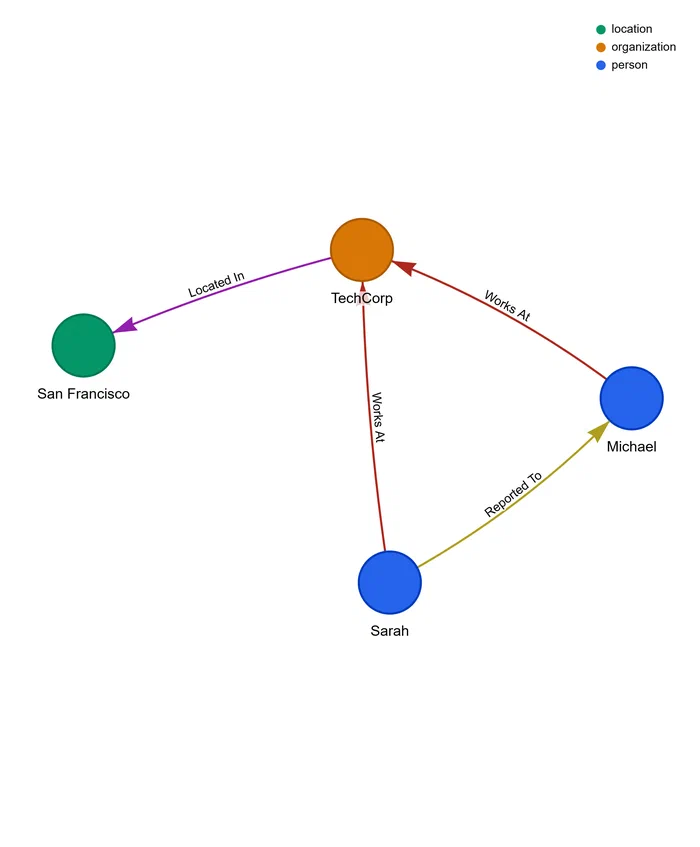
Transform this sentence:
Sarah works at TechCorp in San Francisco and reports to Michael, who is the VP of Engineering.
Into this structured graph:
- Entities: Sarah (person), TechCorp (organization), San Francisco (location), Michael (person), VP of Engineering (occupation)
- Relationships: Sarah WORKS_AT TechCorp, TechCorp LOCATED_IN San Francisco, Sarah REPORTS_TO Michael, Michael HAS_ROLE VP of Engineering
The problem, and what changed #
Knowledge is typically created and stored as natural language: documents, transcripts, articles. But it’s most useful when structured as a graph. Traditional text is hard to navigate: searching through hours of meeting transcripts to find who mentioned a deadline, reading pages of documentation to understand how concepts connect, or hunting through wikis and docs for company knowledge that has no unified view.
What made this newly practical is that modern LLMs changed the equation. They read text and extract structured information with surprising accuracy: understanding context, resolving ambiguities, and catching relationships traditional NLP pipelines would miss. That’s what Nodus does: it extracts entities and relationships from any text, builds interactive visual knowledge graphs, exports to HTML, JSON, or TXT, and costs less than a tenth of a cent per article on Gemini 3.5 Flash-Lite (and nothing on the free tier), with no manual tagging or NLP pipeline to maintain. Instead of a complex extraction system, you write straightforward code against Gemini’s structured output.
Quick start #
Get the source code #
# Clone repository without downloading all files
git clone --depth 1 --filter=blob:none --sparse git@github.com:jebucaro/blog-code.git

# Navigate to repository
cd blog-code

# Download only the folder you need
git sparse-checkout set python/Nodus

# Navigate to the Nodus project directory
cd python/Nodus
Configure the project #
# Copy the example environment file
cp .env.example .env

# Edit .env and replace the empty GEMINI_API_KEY value with your actual key
# On Windows: notepad .env (or your preferred editor)
# On Mac/Linux: nano .env (or your preferred editor)

# Install dependencies
uv sync
Launch the application #
Option 1: Using uv #
uv run streamlit run src/nodus/main.pyOption 2: Using Docker #
# 1. Ensure Docker Desktop is running, then build the image
docker build -t nodus:latest .

# 2. Run with environment variable
docker run -p 8501:8501 -e GEMINI_API_KEY=your_key_here nodus:latest

# 3. Or use .env file
docker run -p 8501:8501 --env-file .env nodus:latest

# 4. Access the app at http://localhost:8501
Results #
The interface gives you four perspectives on your extracted knowledge:
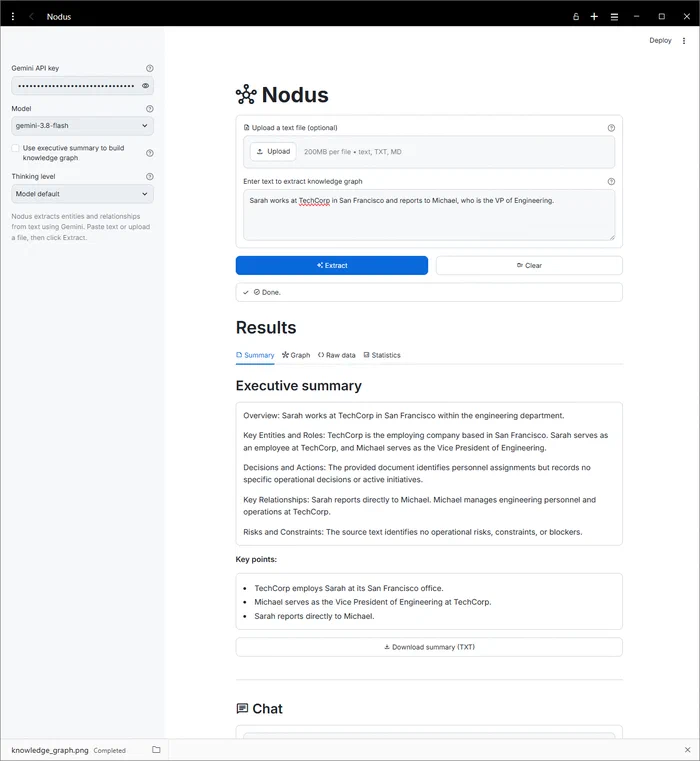
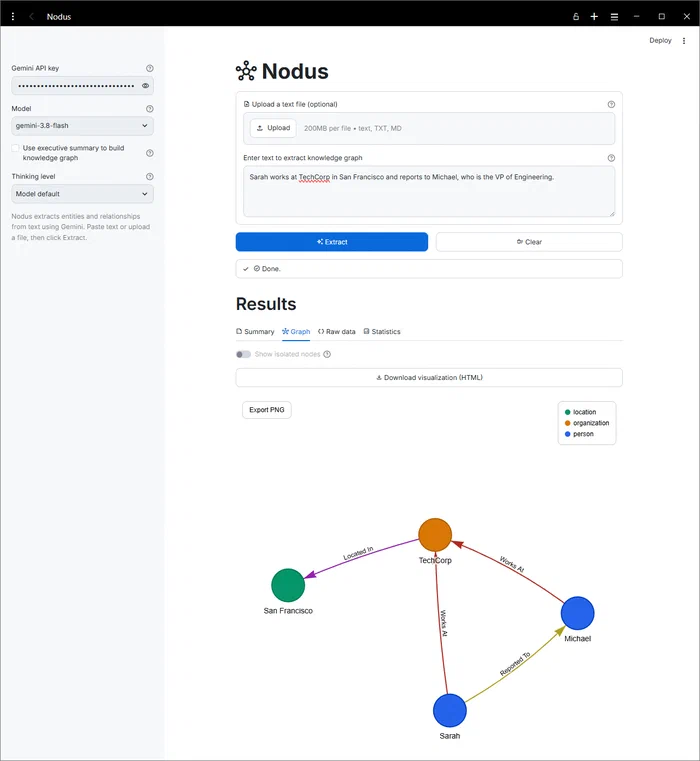
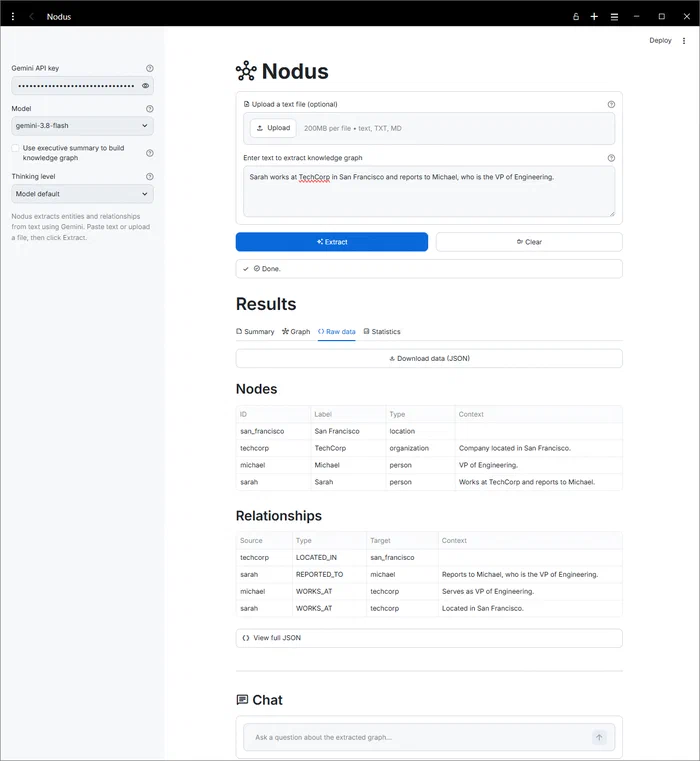
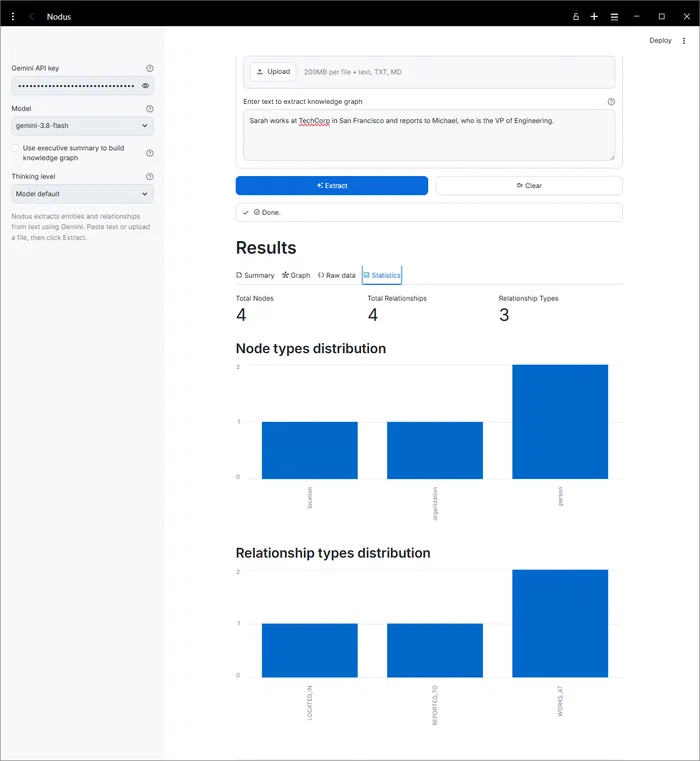
Four tabs cover the results: a structured Summary with key insights, an interactive physics-based Visualization, Raw Data as tables and JSON for inspecting nodes and relationships (grouped and sorted by relationship type, then source, then target, with each item’s supporting context alongside it), and Statistics on node count and relationship types. Below the tabs, a Chat section lets you ask questions about the document. You can export the graph as HTML (interactive), JSON (structured data), or TXT (summary).
How it works #
I designed this implementation to prioritize clarity over abstraction. Each layer is intentionally simple, closer to a learning foundation than a production framework, so it’s easy to understand, modify, and extend.
Extraction layer #
Modern LLMs accept schema definitions directly, which eliminates manual JSON parsing and is a big part of what makes this accessible now. Nodus passes the Pydantic schema to Gemini as the response_format, so the model returns JSON that maps straight onto the data models. The extractor runs two phases, a structured executive summary and the entity/relationship extraction. By default the graph is built from the original text (which keeps the detail that fills each node’s and relationship’s context) and the two calls run in parallel. You can opt into building the graph from the summary instead, for a higher-level graph, though most fine detail is lost that way.
class GeminiExtractor:
    def extract_with_summary(
        self,
        text: str,
        use_summary_for_kg: bool = False,
        show_summary: bool = True,
        on_progress: Callable[[str], None] | None = None,
    ) -> ExtractionResult:
        summary: ExecutiveSummary | None = None

        if use_summary_for_kg:
            # Sequential: the summary feeds the knowledge graph
            summary = self.summarize(text)
            knowledge_graph = self.extract(summary.summary)
        elif show_summary:
            # Parallel: summarize and extract from the original text at once
            with concurrent.futures.ThreadPoolExecutor(max_workers=2) as executor:
                summary_future = executor.submit(self.summarize, text)
                kg_future = executor.submit(self.extract, text)
                summary = summary_future.result()
                knowledge_graph = kg_future.result()
        else:
            knowledge_graph = self.extract(text)

        return ExtractionResult(summary=summary, knowledge_graph=knowledge_graph)
You also pick a thinking level (the model’s default, or low/medium/high) to trade speed for reasoning depth on harder text. A few constraints keep extraction consistent: semantic lowercase node IDs (sarah rather than person_1), uppercase relationship types (WORKS_AT not works_at), and explicit coreference rules so “Michael” and “he” map to the same entity. Those semantic IDs make extraction issues much easier to debug than generic numeric ones.
Because the input text is untrusted, Nodus wraps it in explicit delimiters and tells the model to treat everything inside as data, not instructions. Paired with system-prompt rules that refuse role changes, this is a practical first line of defense against prompt injection in user-submitted content. One caveat: the Interactions API doesn’t currently expose the adjustable safety filters, so only Gemini’s always-on core protections (like child safety) apply.
Data models #
Clear data models establish the contract between the LLM and your application. I use Pydantic models to define exactly what structure I expect back from Gemini:
class Node(BaseModel):
    id: str  # Semantic identifier (lowercase with underscores)
    label: str | None  # Human-readable name (auto-generated from id if omitted)
    type: str  # Entity category (e.g., person, organization)
    context: str | None  # Short supporting detail from the text (date, number, reason)

class Relationship(BaseModel):
    id: str  # Relationship identifier
    type: str  # Relationship type (UPPERCASE with underscores)
    source_node_id: str
    target_node_id: str
    context: str | None  # Short supporting detail about this relationship

class KnowledgeGraph(BaseModel):
    nodes: list[Node]
    relationships: list[Relationship]

class ExecutiveSummary(BaseModel):
    summary: str  # Structured briefing text with the five section headings
    key_points: list[str] | None  # Optional 3-7 executive-level highlights

class ExtractionResult(BaseModel):
    summary: ExecutiveSummary | None
    knowledge_graph: KnowledgeGraph
The KnowledgeGraph model deduplicates automatically, both by relationship ID (exact duplicates) and by semantic triplet (source_node_id, type, target_node_id) for functionally equivalent relationships. That handles the common case where the LLM generates the same relationship more than once with different IDs.
The optional context field holds a short (up to 200 characters) supporting detail the label and type alone don’t capture, a date, number, quote fragment, or reason, and it shows up in the graph tooltips and the Raw Data tables. It’s often absent, so the extraction schema requires it as a string and an empty value normalizes back to nothing. Chat never sees it, since chat works from the original source text.
Graph repair layer #
Even with strict prompts, the model occasionally emits a relationship that points at a node ID it never defined, or reuses a slightly different spelling. Rather than silently dropping those edges, a repair pass runs between extraction and display. For each dangling endpoint it tries, in order: an exact node ID match, a normalized ID or label match, and a fuzzy match (with a high cutoff so typos get fixed without merging genuinely distinct entities). If nothing matches, it creates a labeled placeholder node so the edge survives. Self-loops are dropped and counted, isolated nodes are kept and reported, and the interface surfaces a small summary of what was repaired so nothing happens behind your back. The original graph is never mutated, which keeps the raw output available for inspection.
Visualization layer #
Raw graph data is useful, but visualization is where patterns that were invisible in the text become visible. Deterministic color assignment (hashing node types to a color palette) keeps entity types visually consistent across different graphs, which helps you build a mental model quickly. A force-directed layout (ForceAtlas2) clusters connected nodes together and spreads isolated ones apart, often surfacing structure that isn’t obvious in the raw data. A relationship-type filter overlay lets you show or hide edges by type, with All and None shortcuts, and it hides edges without moving the nodes. The renderer supports both HTML string generation and file output, so it works equally well embedded in a web app or as a standalone visualization.
Interface layer #
The Streamlit interface keeps the flow simple: configure API credentials, pick a model and thinking level, submit text directly or upload a .txt/.md file, choose whether to build the graph from the executive summary or the original text, browse results across the four tabs, filter the graph by relationship type, and export as HTML, JSON, or TXT. When a graph has isolated nodes, a toggle lets you show or hide them without re-running the extraction. Below the tabs, a Chat section lets you ask questions about the document, covered next.
Chat with your document #
Once a graph is extracted, the Chat section below the tabs answers questions about the document. Answers come from the original source text, with the extracted relationship list used as a consistency aid for entity names. Each answer ends with an ### Evidence section: verbatim quotes from the document, plus a “From the relationships:” line for anything drawn from the relationship list. The quotes are written by the model and can occasionally be inexact, so check anything important against the source. Chat starts fresh whenever you re-extract or click Clear.
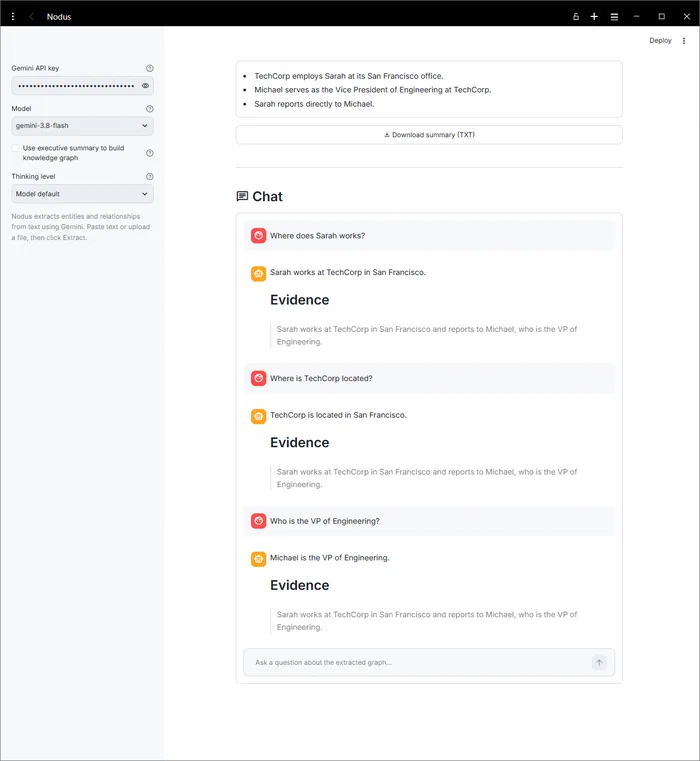
store=False, but Chat uses store=True and sends the full original source text on the first question, so Gemini retains the conversation and your document for the Interactions API retention window (55 days on the paid tier, 1 day on the free tier). This applies only while you’re using Chat, and it resets whenever you re-extract or click Clear.Cost considerations #
This approach is affordable enough to matter. Nodus offers three curated models, gemini-3.5-flash-lite (fastest, cheapest), gemini-3.8-flash (the balanced default), and gemini-3.1-pro-preview (most capable), so you can dial cost against quality. On the cheapest, Gemini 3.5 Flash-Lite (paid tier) charges $0.30 per 1M input tokens and $2.50 per 1M output tokens. A 500-word extraction runs roughly 600 input tokens and 300 output tokens: (600 / 1,000,000) × $0.30 = $0.00018 for input, (300 / 1,000,000) × $2.50 = $0.00075 for output, for a total around $0.0009 per extraction, still under a tenth of a cent. Building the graph from the executive summary makes two model calls instead of one, so budget for roughly double when that option is enabled. Gemini 3.5 Flash-Lite also has a free tier with no cost for input or output tokens, which is enough for testing and small-scale use.
Real-world applications #
Meeting notes and transcripts are the obvious case: instead of searching through hours of notes for who mentioned a deadline, you query the graph directly (“show me all deadlines mentioned by Sarah in Q1 meetings”), since the relationships are already extracted and structured. The same idea applies to research and learning, where a knowledge graph built while you read technical documentation shows how ideas connect and which concepts are central. At an organizational level, it can unify information scattered across documents, wikis, and conversations into one map, regardless of where each piece originally lived.
From here you could connect it to a document database for automatic extraction, build a conversational query interface over the graphs, merge graphs from multiple sources, or add temporal tracking to see how knowledge evolves over time.
Explore the code #
The complete implementation is available on GitHub ➡️
. I kept the codebase intentionally minimal and documented so you can understand every piece and adapt it. Start with models.py (Pydantic data models with validation and auto-deduplication), extractor.py (the two-phase extraction logic, prompts, and prompt-injection guards), repair.py (the endpoint-repair pass that keeps dangling edges from being dropped), visualizer.py (PyVis-based graph rendering), chat.py (the document Q&A session grounded in the source text, with evidence-cited answers), app.py (the Streamlit interface), settings.py (environment configuration, model and thinking-level selection), and errors.py (a custom exception hierarchy for user-friendly errors).
Why I built it from scratch #
Thu Vu’s original implementation uses GPT-4 and LangChain’s LLMGraphTransformer, and it’s worth watching for how a high-level abstraction simplifies extraction:
That abstraction is powerful, but it also hides the questions you need answered when you’re debugging unexpected extraction results, optimizing prompts for a specific domain, adapting the system to a different LLM provider, or controlling costs at scale. Working directly with the Gemini API instead of through a framework showed me the core pattern more clearly: strip away multi-provider support and framework overhead, and you can see exactly how prompt design drives the quality of extracted entities and relationships. It also means I can tune every part of the pipeline directly, and the knowledge of how structured output works at the API level carries over to any other LLM provider I use later.
The goal here isn’t to argue against framework-based approaches, just to understand the mechanism underneath them.
What will you extract? #
Knowledge graphs change how you interact with information, whether you’re managing research, organizing meeting notes, or building AI applications on top of structured data. What’s the first text you’ll try converting into a knowledge graph? Share your use case or questions on LinkedIn, I’d love to hear what you build with this.